String Data Byte Swap in PLC Collector
Purpose
Section titled “Purpose”Correct the byte order of string data collected from a PLC so that strings stored in the PLC can be handled in the expected order.
What you will learn
Section titled “What you will learn”- Why strings collected from a PLC may appear with swapped characters or garbled text
- How to configure the Byte swap setting in PLC Collector
- The difference between collected strings when Byte swap is enabled and disabled
Requirements
Section titled “Requirements”Collect the following string data from the PLC and retrieve each value as the expected string.
| Data name | Address | Expected value |
|---|---|---|
lot_number | D0000 | 12345678 |
model_code | D0010 | ABCD |
station_name | D0020 | LINE01TEST |
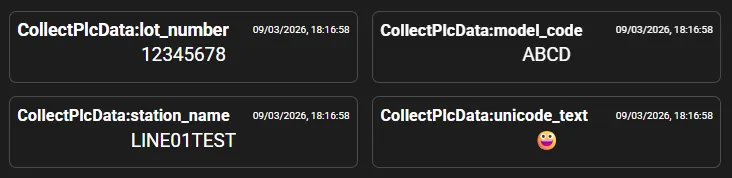
unicode_text | D0030 | 😀 |
Components used
Section titled “Components used”- PLC Collector (data collection)
Workflow
Section titled “Workflow”- Collect the following string data with PLC Collector:
- lot_number (D0000)
- model_code (D0010)
- station_name (D0020)
- unicode_text (D0030)
-
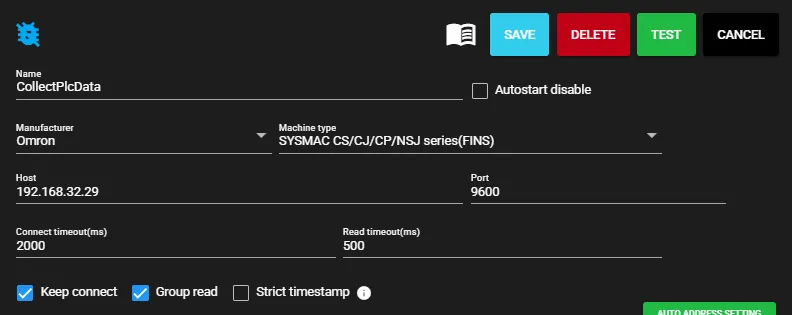
Enter the connection settings for PLC Collector.
-
Configure the string data to collect. Add
lot_number(D0000),model_code(D0010),station_name(D0020), andunicode_text(D0030), and turn Byte swap ON for each data item.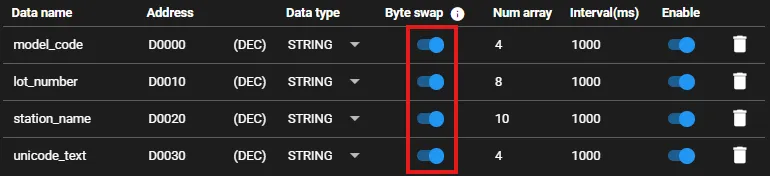
-
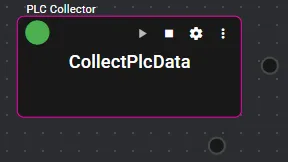
Save the settings and start PLC Collector.
Checking the output
Section titled “Checking the output”Check the string data collected by PLC Collector. When Byte swap was OFF, the strings were collected with swapped characters or garbled text.
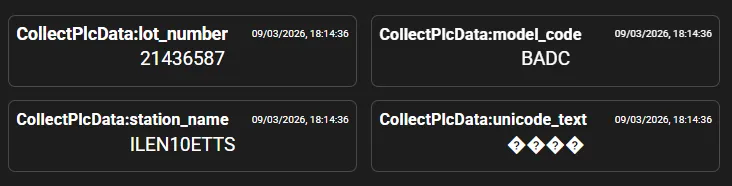
By turning Byte swap ON, the byte order of the string data is corrected, and the expected strings can be collected correctly.