Collecting struct variables with EtherNet/IP Collector
Purpose
Section titled “Purpose”Collect variables defined as structs using the EtherNet/IP Collector.
Project files
Section titled “Project files”This is the project file used in this example.
Note: Import requires SpeeDBee Synapse version 4.9.9 or later.
Note: Update the EtherNet/IP Collector connection settings to match your environment.
Note: The variables used on the PLC side must be defined in advance.
What you will learn
Section titled “What you will learn”- How to configure collection of struct variables
- How to configure collection of struct arrays
- How to configure collection of nested struct variables
- How to configure collection when the number of array elements exceeds the limit (200)
Requirements
Section titled “Requirements”Collect the following struct variables using the EtherNet/IP Collector. The targets include single structs, struct arrays, nested structs, and structs that exceed the array limit.
motor_status (Single Struct: MotorStatus)
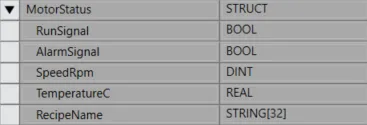
Section titled “motor_status (Single Struct: MotorStatus)”A single struct variable. Collects multiple primitive-type members such as BOOL, DINT, REAL, and STRING as a single tag.
channel_data_list (Struct Array: ARRAY[0..15] OF ChannelData)
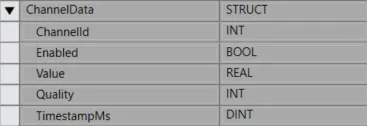
Section titled “channel_data_list (Struct Array: ARRAY[0..15] OF ChannelData)”A struct array variable. Collects an array tag of type ChannelData with 16 elements (0..15).
device_packet (Nested Struct: DevicePacket)
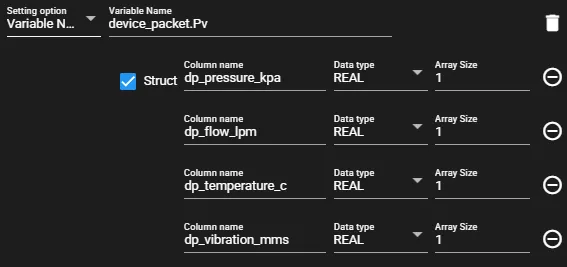
Section titled “device_packet (Nested Struct: DevicePacket)”A nested struct variable. Collects data from the parent struct DevicePacket, which contains child structs DeviceMeta and ProcessValue.
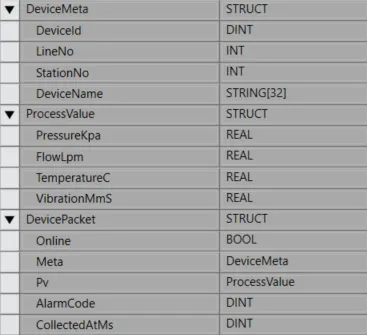
batch_values (Struct Exceeding Array Limit: BatchValues)
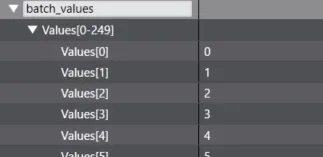
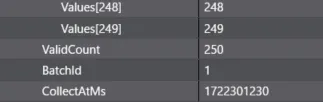
Section titled “batch_values (Struct Exceeding Array Limit: BatchValues)”A struct variable with an array member that exceeds the array limit (200). Collects the struct including values (ARRAY[0..249] OF USINT).
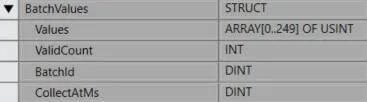
Components used
Section titled “Components used”- EtherNet/IP Collector (data collection)
Workflow
Section titled “Workflow”- Collect the following data with the EtherNet/IP Collector:
- motor_status (MotorStatus)
- channel_data_list (ARRAY[0..15] OF ChannelData)
- device_packet (DevicePacket)
- batch_values (BatchValues)
-
Enter the connection settings for the EtherNet/IP Collector.
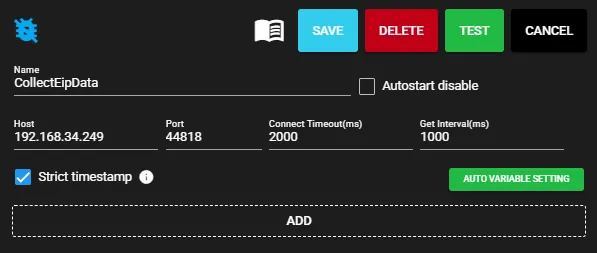
-
Configure the variables to collect. Start by adding the
motor_statusvariable. For structs, check the Struct checkbox to enable adding each member via ADD COLUMN.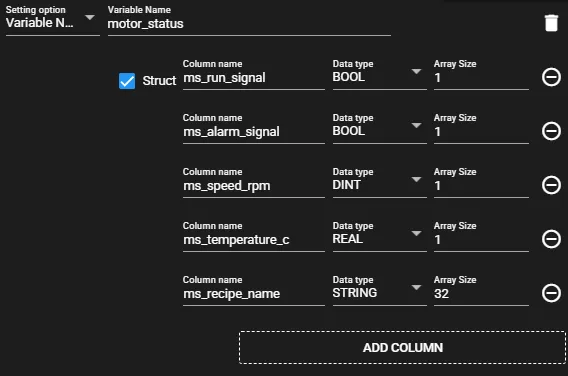
-
Add the
channel_data_listvariable. The current EtherNet/IP Collector does not support bulk retrieval of struct arrays. Therefore, specifychannel_data_list[0]to retrieve only the first element.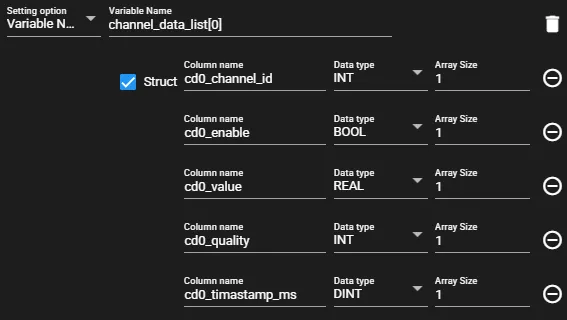
-
Add the
device_packetvariable. The current EtherNet/IP Collector does not support bulk retrieval of nested structs. Specify the child structs individually usingdevice_packet.Metaanddevice_packet.Pvto retrieve only the Meta and Pv data.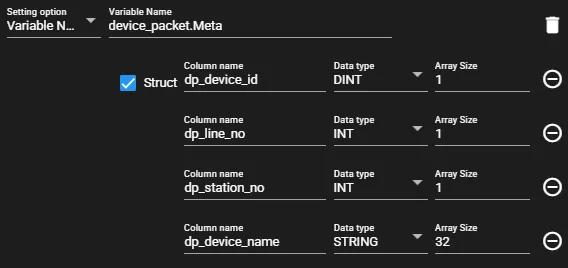
-
Add the
batch_valuesvariable. Due to EtherNet/IP Collector specifications, the maximum number of array elements configurable per column (member) is 200. Split the retrieval into 200 and 50.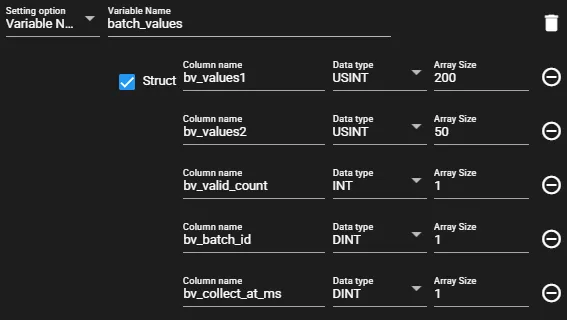
-
Save the settings and start the EtherNet/IP Collector.
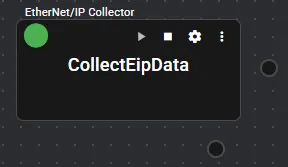
Checking the output
Section titled “Checking the output”The following is a sample of data collected by the EtherNet/IP Collector and output as JSON via the JSON Serializer.
The sections below compare the initial values set on the PLC side with the JSON output to confirm that values are being retrieved correctly.
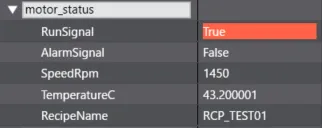
Verification: motor_status
Section titled “Verification: motor_status”JSON output excerpt
"CollectEipData:ms_run_signal": true,"CollectEipData:ms_alarm_signal": false,"CollectEipData:ms_speed_rpm": 1450,"CollectEipData:ms_temperature_c": 43.200,"CollectEipData:ms_recipe_name": "RCP_TEST01",Values confirmed in the tool
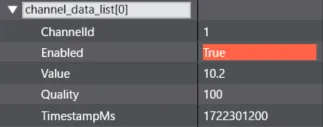
Verification: channel_data_list[0]
Section titled “Verification: channel_data_list[0]”JSON output excerpt
"CollectEipData:cd0_channel_id": 1,"CollectEipData:cd0_enable": true,"CollectEipData:cd0_value": 10.200,"CollectEipData:cd0_quality": 100,"CollectEipData:cd0_timestamp_ms": 1722301200,Values confirmed in the tool
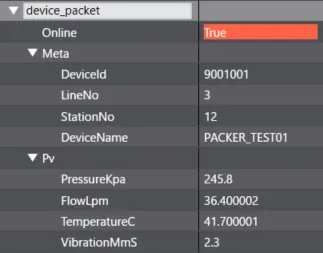
Verification: device_packet.Meta / device_packet.Pv
Section titled “Verification: device_packet.Meta / device_packet.Pv”JSON output excerpt
"CollectEipData:dp_device_id": 9001001,"CollectEipData:dp_line_no": 3,"CollectEipData:dp_station_no": 12,"CollectEipData:dp_device_name": "PACKER_TEST01","CollectEipData:dp_pressure_kpa": 245.800,"CollectEipData:dp_flow_lpm": 36.400,"CollectEipData:dp_temperature_c": 41.700,"CollectEipData:dp_vibration_mms": 2.300,Values confirmed in the tool
Verification: batch_values
Section titled “Verification: batch_values”Due to the array limit constraint, values is split into two columns (bv_values1 and bv_values2) in the output.
JSON output excerpt
"CollectEipData:bv_values1": [0 , 1 , 2 , 3 , 4 , 5 , 6 , 7 , 8 , 9 , 10 , 11 , 12 , 13 , 14 , 15 , 16 , 17 , 18 , 19 , 20 , 21 , 22 , 23 , 24 , 25 , 26 , 27 , 28 , 29 , 30 , 31 , 32 , 33 , 34 , 35 , 36 , 37 , 38 , 39 , 40 , 41 , 42 , 43 , 44 , 45 , 46 , 47 , 48 , 49 , 50 , 51 , 52 , 53 , 54 , 55 , 56 , 57 , 58 , 59 , 60 , 61 , 62 , 63 , 64 , 65 , 66 , 67 , 68 , 69 , 70 , 71 , 72 , 73 , 74 , 75 , 76 , 77 , 78 , 79 , 80 , 81 , 82 , 83 , 84 , 85 , 86 , 87 , 88 , 89 , 90 , 91 , 92 , 93 , 94 , 95 , 96 , 97 , 98 , 99 , 100 , 101 , 102 , 103 , 104 , 105 , 106 , 107 , 108 , 109 , 110 , 111 , 112 , 113 , 114 , 115 , 116 , 117 , 118 , 119 , 120 , 121 , 122 , 123 , 124 , 125 , 126 , 127 , 128 , 129 , 130 , 131 , 132 , 133 , 134 , 135 , 136 , 137 , 138 , 139 , 140 , 141 , 142 , 143 , 144 , 145 , 146 , 147 , 148 , 149 , 150 , 151 , 152 , 153 , 154 , 155 , 156 , 157 , 158 , 159 , 160 , 161 , 162 , 163 , 164 , 165 , 166 , 167 , 168 , 169 , 170 , 171 , 172 , 173 , 174 , 175 , 176 , 177 , 178 , 179 , 180 , 181 , 182 , 183 , 184 , 185 , 186 , 187 , 188 , 189 , 190 , 191 , 192 , 193 , 194 , 195 , 196 , 197 , 198 , 199]"CollectEipData:bv_values2": [200 , 201 , 202 , 203 , 204 , 205 , 206 , 207 , 208 , 209 , 210 , 211 , 212 , 213 , 214 , 215 , 216 , 217 , 218 , 219 , 220 , 221 , 222 , 223 , 224 , 225 , 226 , 227 , 228 , 229 , 230 , 231 , 232 , 233 , 234 , 235 , 236 , 237 , 238 , 239 , 240 , 241 , 242 , 243 , 244 , 245 , 246 , 247 , 248 , 249]"CollectEipData:bv_valid_count": 250,"CollectEipData:bv_batch_id": 1,"CollectEipData:bv_collect_at_ms": 1722301230Values confirmed in the tool