
Data Aggregation at the Inport
Purpose
Section titled “Purpose”Combine data received from multiple components with slightly different nanosecond timestamps into one record for each configured window width, then write the records.
Project files
Section titled “Project files”These are the project files used in this case study. A standard version and a version with the PLC Collectors configured in simulation mode are available.
Note: Import requires SpeeDBee Synapse version 4.9.9 or later.
What you will learn
Section titled “What you will learn”- Why data from multiple components is output as separate records
- How to use the aggregation function in the inport settings to combine data into one record
Requirements
Section titled “Requirements”Collect temperature and pressure from each PLC with PLC Collectors connected to PLC-A and PLC-B, and input the data into the same inport of the CSV Serializer. Divide the input data by the configured window width and combine the data within each window into one record.
| Component | Data | Address | Description |
|---|---|---|---|
| PLC Collector (PLC-A) | temperature | D0100 | Temperature (°C) |
| PLC Collector (PLC-A) | pressure | D0101 | Pressure (kPa) |
| PLC Collector (PLC-B) | temperature | D0100 | Temperature (°C) |
| PLC Collector (PLC-B) | pressure | D0101 | Pressure (kPa) |
Even when PLC-A and PLC-B collect the same types of data, their collection timings do not completely match. Because timestamps are assigned with nanosecond precision, the slight timing difference causes the timestamps to differ and the records to be separated.
When aggregation is not configured, the CSV Serializer outputs data as follows. Because the PLC-A and PLC-B data have different timestamps, each record contains data from only one PLC.
| timestamp | PLC-A:pressure | PLC-A:temperature | PLC-B:pressure | PLC-B:temperature |
|---|---|---|---|---|
| 13:08:04.947378445+0900 | 68 | 25 | ||
| 13:08:04.949666433+0900 | 82 | 31 | ||
| 13:08:05.947378445+0900 | 68 | 25 | ||
| 13:08:05.949666433+0900 | 83 | 31 |
Note: The date portion (YYYY-MM-DD) is omitted.
Because data with different timestamps is output as separate records, use the aggregation function to combine data within the same window into one record.
Components used
Section titled “Components used”- PLC Collector (collects data from PLC-A and PLC-B)
- CSV Serializer (converts aggregated data to CSV)
Workflow
Section titled “Workflow”- Collect data from PLC-A and PLC-B with the PLC Collectors
- Input the data collected from PLC-A and PLC-B into the CSV Serializer
- Use the aggregation function in the CSV Serializer’s inport settings to combine data within each configured window into one record
- Output the aggregated data as one CSV record
-
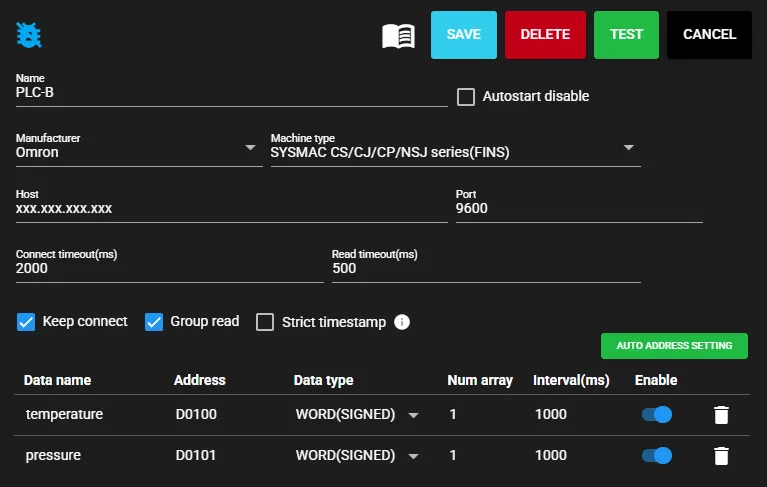
Configure the PLC Collectors. Specify the connection target, addresses to collect, data types, and other settings for PLC-A and PLC-B so that
temperatureandpressurecan be collected. In this configuration, collecttemperaturefromD0100andpressurefromD0101on each PLC.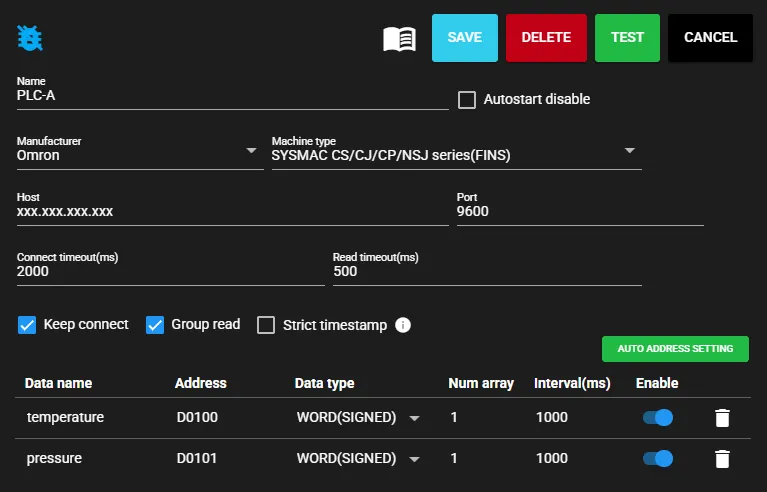
-
Configure the CSV Serializer. In this case, set the file switch count to
10so that one file is output for every 10 records.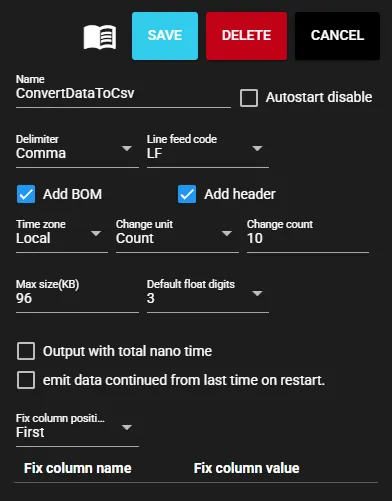
-
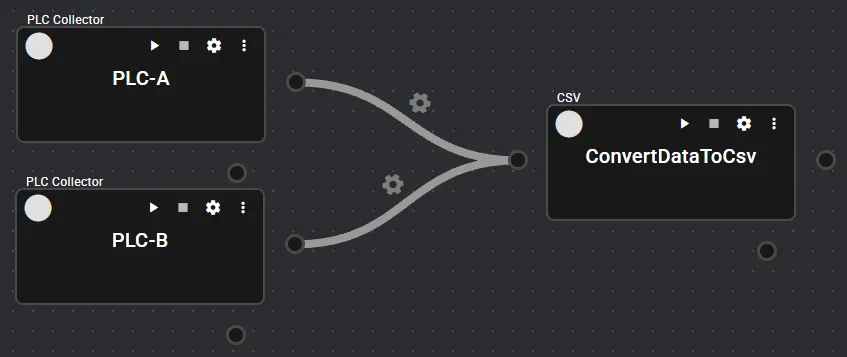
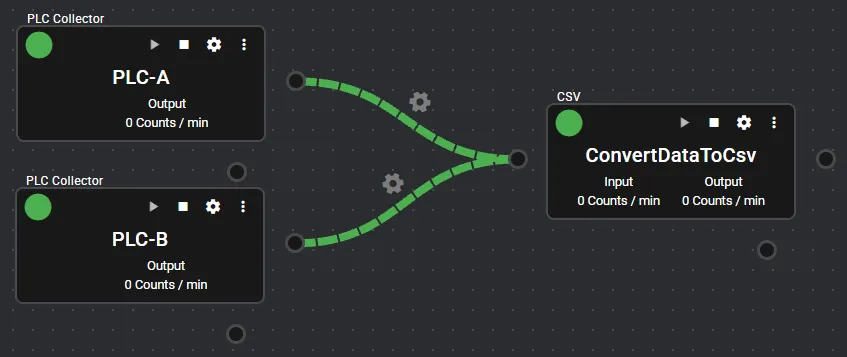
After configuring the CSV Serializer, connect each PLC Collector to the CSV Serializer’s inport. Configure the flow so that data from multiple components is input to the same inport.
-
Right-click the CSV Serializer’s inport, open the inport settings, and turn Aggregation ON. Specify the Window width. In this case, set it to
1 secondand combine data within each window interval (1 second) into the same record.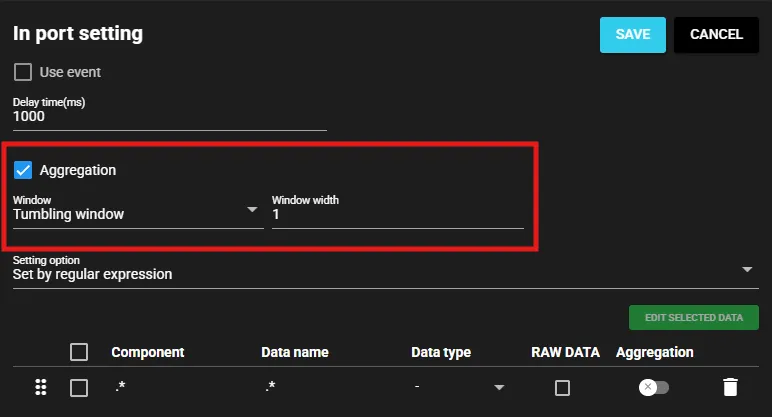
-
Configure aggregation for the input data. In this case, specify the target using regular expressions. Set the component name to
.*and the data name to.*to target all data input to the CSV Serializer.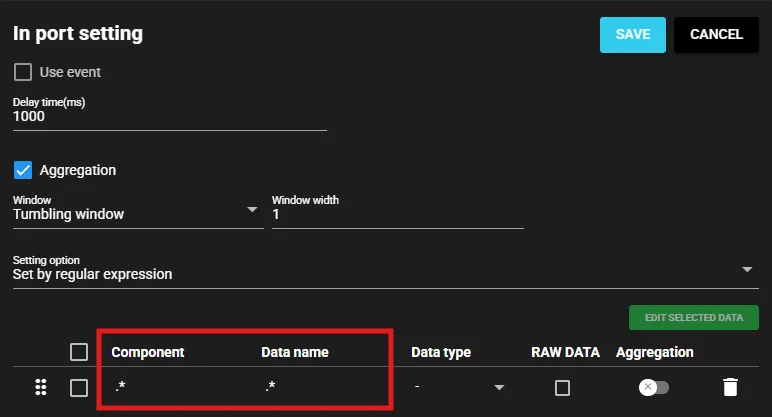
-
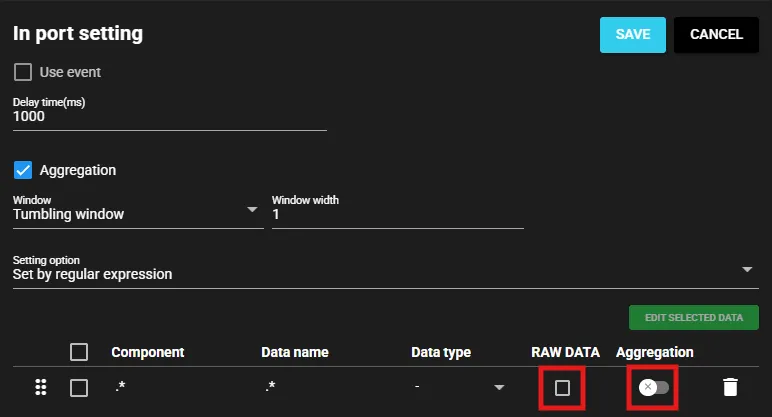
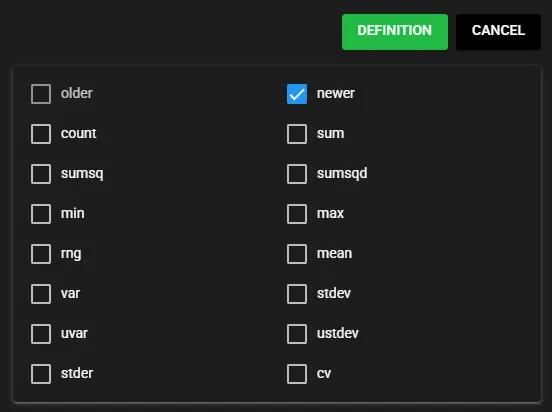
To output only aggregated values, turn off RAW DATA. Click the aggregation toggle for the specified input data and select newer from the aggregation options. In this case, only the newer value within the window is used.
-
Save the settings and start each component.
Checking the output
Section titled “Checking the output”Data within the same window interval is output as one CSV record.
Download the aggregated CSV sample
The following is an excerpt from the CSV output after aggregation. Even when timestamps assigned to data from each component differ at nanosecond precision, data within the same window can be output as one record.
| timestamp | PLC-A:pressure.newer | PLC-A:temperature.newer | PLC-B:pressure.newer | PLC-B:temperature.newer |
|---|---|---|---|---|
| 14:37:13.551084040+0900 | 71 | 26 | 86 | 34 |
| 14:37:14.551084040+0900 | 71 | 26 | 87 | 34 |
| 14:37:15.551084040+0900 | 71 | 27 | 87 | 35 |
| 14:37:16.551084040+0900 | 72 | 27 | 88 | 35 |
| 14:37:17.551084040+0900 | 68 | 25 | 82 | 31 |
| 14:37:18.551084040+0900 | 68 | 25 | 83 | 31 |
Note: The date portion (YYYY-MM-DD) is omitted.