
Calculating Array Data Collected by PLC Collector
Purpose
Section titled “Purpose”Convert data collected by PLC Collector as an array from a continuous memory area into a format that Compute Collector can use, then perform calculations on it.
Project files
Section titled “Project files”These are the project files used in this example. A standard version and a version with the PLC Collector configured in simulation mode are available.
Note: Import requires SpeeDBee Synapse version 4.9.9 or later.
What you will learn
Section titled “What you will learn”- How to pass array data collected by PLC Collector to Compute Collector
- Why ARRAY SPLIT in Data Conversion is needed
- The workflow for decomposing array data into individual data items and using them in calculations
Requirements
Section titled “Requirements”Collect temperature data from multiple points in a PLC as an array from a continuous memory area, then calculate the average temperature and temperature differences using each value.
In this example, PLC Collector collects the following array data.
| Data name | Address example | Data type | Array length | Description |
|---|---|---|---|---|
temperature_values | D0100 | WORD | 4 | Four temperature values (0.1°C units) |
Each array element corresponds to the following measurement point.
| Element | Description |
|---|---|
temperature_values[0] | Inlet temperature |
temperature_values[1] | Center temperature |
temperature_values[2] | Outlet temperature |
temperature_values[3] | Ambient temperature |
Based on this data, create the following calculated values.
| Calculated value | Description |
|---|---|
average_temperature_c | Average of inlet, center, and outlet temperatures (°C) |
inlet_outlet_diff_c | Difference between inlet and outlet temperatures (°C) |
center_ambient_diff_c | Difference between center and ambient temperatures (°C) |
Components used
Section titled “Components used”- PLC Collector (array data collection)
- Data Conversion (array data decomposition)
- Compute Collector (calculations using decomposed data)
Workflow
Section titled “Workflow”- Collect four temperature values as an array from a continuous memory area with PLC Collector
- Decompose the array data received from PLC Collector into individual elements with Data Conversion
- Pass the decomposed data to Compute Collector
- Use the decomposed temperature data in Compute Collector to calculate and output the average temperature and temperature differences
-
Configure PLC Collector. Specify the PLC connection target, address, data type, array length, and other settings so that the four temperature values can be collected as an array. In this example, four temperature values are collected from
D0100astemperature_values.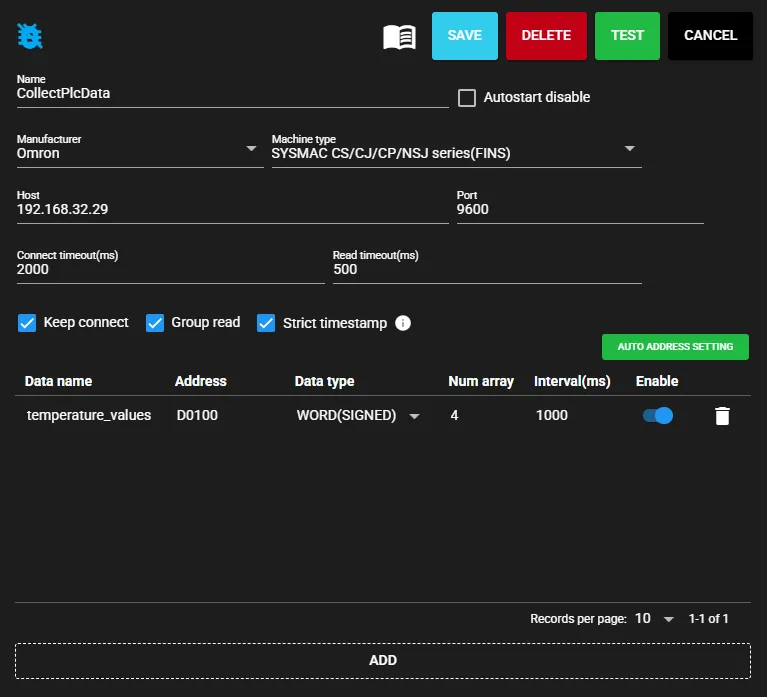
-
Add Data Conversion and connect it to PLC Collector. When registering a new Data Conversion component, a dialog appears to select the component to connect to the input port. Select the PLC Collector configured in step 1 and click CONNECT.
Note: PLC Collector must be running before it can be selected. Start it beforehand. It can also be started using the ▶ button.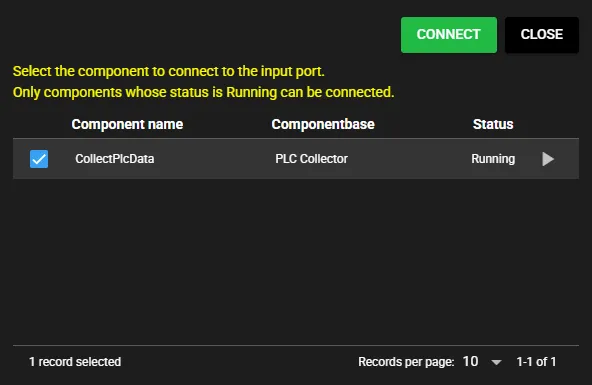
-
Configure ARRAY SPLIT in Data Conversion. Select the array data received from PLC Collector and configure it so that the elements used in calculations are output as individual data items.
Output each element of
temperature_valueswith a name that makes the measurement point clear.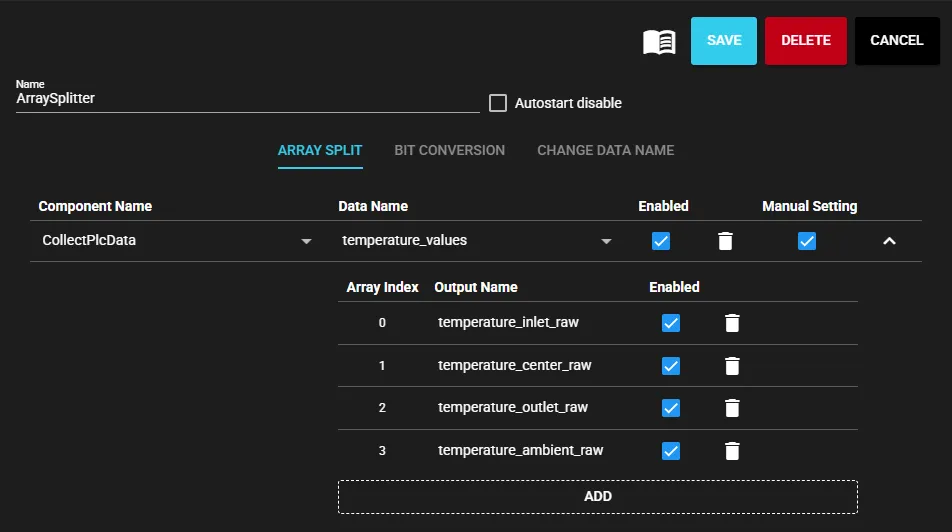
Source data Decomposed data example temperature_values[0]temperature_inlet_rawtemperature_values[1]temperature_center_rawtemperature_values[2]temperature_outlet_rawtemperature_values[3]temperature_ambient_raw -
Add Compute Collector and connect it to Data Conversion. When registering a new Compute Collector, a dialog appears to select the component to connect to the input port. Select the Data Conversion component configured in step 3 and click CONNECT.
Note: Data Conversion must be running before it can be selected. Start it beforehand. It can also be started using the ▶ button.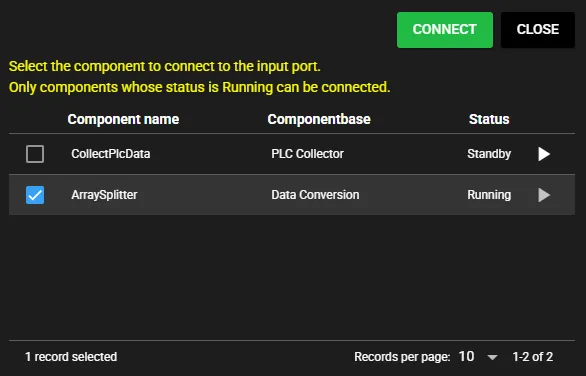
-
Configure the calculation formulas in Compute Collector. First, in the input data settings, assign the temperature data extracted by ARRAY SPLIT to
$A,$B,$C, and$D.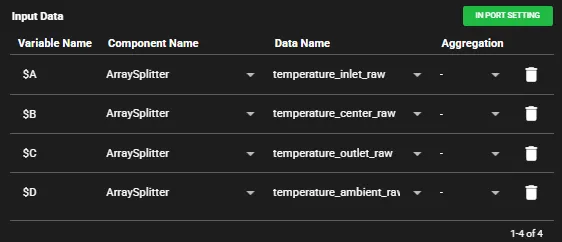
Variable Input data $Atemperature_inlet_raw$Btemperature_center_raw$Ctemperature_outlet_raw$Dtemperature_ambient_rawAfter configuring the input data, create the required calculation formulas using variables such as
$A. In this example, the PLC values are assumed to be in 0.1°C units, so multiply by0.1to convert them to °C.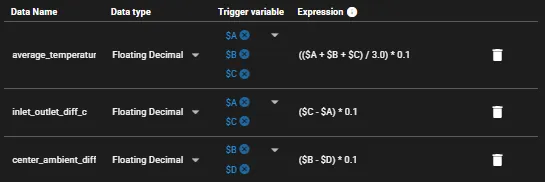
Data name Formula Description average_temperature_c(($A + $B + $C) / 3.0) * 0.1Average of inlet, center, and outlet temperatures (°C) inlet_outlet_diff_c($C - $A) * 0.1Difference between inlet and outlet temperatures (°C) center_ambient_diff_c($B - $D) * 0.1Difference between center and ambient temperatures (°C) -
Save the settings and start each component.

Checking the output
Section titled “Checking the output”Check the output data from Compute Collector and verify that the calculation results are output using the decomposed data.
RAW values after ARRAY SPLIT
Section titled “RAW values after ARRAY SPLIT”Check the RAW values decomposed by Data Conversion (ArraySplitter).
You can see that each element of temperature_values collected by PLC Collector is output as an individual temperature data item.
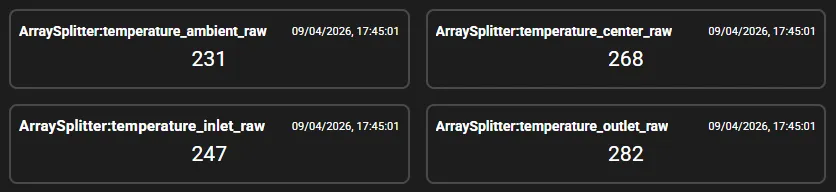
| Decomposed data | Value | Converted value |
|---|---|---|
temperature_inlet_raw | 247 | 24.7°C |
temperature_center_raw | 268 | 26.8°C |
temperature_outlet_raw | 282 | 28.2°C |
temperature_ambient_raw | 231 | 23.1°C |
Calculated output values
Section titled “Calculated output values”Check the output from Compute Collector (CalculateTemperatureMetrics).
You can see that the average temperature and temperature differences are output using $A, $B, $C, and $D assigned in the input data settings.
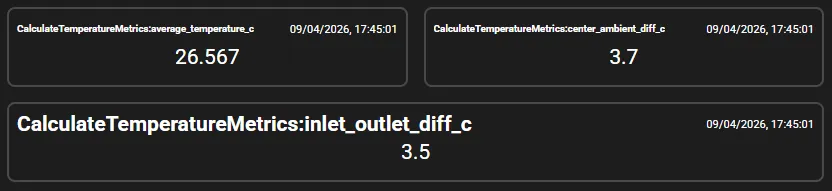
| Calculated data | Value | Description |
|---|---|---|
average_temperature_c | 26.567 | Average of inlet, center, and outlet temperatures (°C) |
inlet_outlet_diff_c | 3.5 | Difference between inlet and outlet temperatures (°C) |
center_ambient_diff_c | 3.7 | Difference between center and ambient temperatures (°C) |
As shown above, the average temperature is 26.567°C, the inlet-outlet temperature difference is 3.5°C, and the center-ambient temperature difference is 3.7°C.